Bring your products online.Manage sales from one dashboard.
GestMark is the software for shops, online sellers and agencies. Start with your products or catalogue, connect compatible channels and organise products, prices and orders in one place.
Start with a small product list, prepare an item and follow an order. At each step you will see what you do, what gets organised and why it helps.
A guided tour with sample dataNo account needed. No real products are published.
Step 01 / 04Illustrative example
From your list to organised products
Choose a starting point and compare the original data with the result in GestMark.
Your practical example: A homeware shop
Each client keeps their own example: items, prices, listing and order. Switch between shops to see how their data stays separate.
Imagine taking your shop online
You have a homeware shop. You want to choose some products, prepare them for online selling and follow your orders. Let’s go through it together.
Where would you like to start?
1
Your starting point
Names, costs and quantities are already in your spreadsheet. See how they become organised product records.
Shop products.xlsx
Product
Cost
Units
500 ml insulated bottle
€12.00
18
Insulated mug
€8.00
25
Lunch box
€15.00
9
Three sample rows. You can start with a compatible file that already contains your items.
Start with a photo of an item. The draft helps you prepare its product details; you enter the cost and quantity.
A photo of an item in your shop
With AI Scan, you can start from a photo to prepare a draft for review. Here we show a sample result.
Choose the items you want to offer. Their product records will show the supplier’s cost and available quantities.
Supplier price list · example
Import this item
Product
Cost
Units
500 ml insulated bottle
€11.80
42
Insulated mug
€7.50
64
Lunch box
€14.50
21
Choose the items to import. Costs and quantities come from the sample price list.
2
Your products in GestMark
Your result will appear here
Try the button on the left: the same data will become product records.
Use the button in the section above to see your products organised.
Choose the product to follow
The photo cannot tell you the purchase cost or the available quantity: you add those in the next step.
Choose an item: you will follow it through pricing, preparing a listing and receiving an order.
Why this helps
Reuse the data you already have without copying it out product by product.
Step 02 / 04Illustrative example
Prepare the product details and check the price
Follow the same item: complete its details and see what is left after the costs you entered.
Your practical example: A homeware shop
Each client keeps their own example: items, prices, listing and order. Switch between shops to see how their data stays separate.
Start with your products
In the first step, choose a list, a photo or a supplier’s price list. Your selected product will then appear here.
You are following—
At this price, what is left?
The selling price also needs to cover purchase cost, commission and shipping. Change the values and see the result.
Add the pen’s cost and quantity. You can use sample values: the calculation remains a demonstration.
Why this helps
Make pricing decisions with purchase cost, commission and shipping in view together.
Step 03 / 04Illustrative example
Choose where to offer the product
See the information you have already prepared and check it for your chosen destination.
Your practical example: A homeware shop
Each client keeps their own example: items, prices, listing and order. Switch between shops to see how their data stays separate.
Start with your products
In the first step, choose a list, a photo or a supplier’s price list. Your selected product will then appear here.
You are following—
See the work you have already done
Choose a sample destination. The title, price and quantity come from the product details you prepared.
The information you have already prepared
—
The name, description, price and quantity are reused. You can go back to correct them.
Description
—
Selling price (€)
—
Available units
—
Where would you like to offer the product?
—
Sample status
To be prepared
Offer reference
—
What do you need for a real sale?
You need an account on a compatible channel with the necessary permissions. Each site may require more information and decides whether to accept the product; this demo does not open accounts or send listings.
Why this helps
Reuse your product details and stay in control of the data before sending it to a compatible channel.
Step 04 / 04Illustrative example
Follow the order and your next task
A sample order shows the item, quantity, source and next action.
Your practical example: A homeware shop
Each client keeps their own example: items, prices, listing and order. Switch between shops to see how their data stays separate.
Start with your products
In the first step, choose a list, a photo or a supplier’s price list. Your selected product will then appear here.
An order has arrived: what do you do next?
See what was bought, where the order came from and how many units you need to prepare.
First prepare the listing and show the acceptance outcome in step 3.
Bring up an order for the product you have prepared.
Order reference—
—
Customer
—
Where would you like to offer the product?
—
Order status
—
Order quantity
—
Product value
—
Remaining sample stock
—
Your next task
You have followed a product from list to order
You gathered the data, checked the price, prepared a listing and organised a sample order. This is the work GestMark helps you keep together.
Why this helps
See what was ordered and which items to prepare in one organised view.
01 / 04
Connect the marketplace accounts you use, choose the tools in your plan and organise catalogues, offers and orders with GestMark.
Do you know where to start now?
What you can do with each connection
These are illustrative examples only. Other invoicing programs, marketplaces, online stores, suppliers and shipping services can be integrated on request.
Marketplaces
Discover which operations you can manage on connected marketplaces.
Kaufland
What you can do
Submit offers, update quantities for existing offers and import orders.
What you need to connect
A verified seller account, API keys, an enabled storefront and valid SKU/EAN mappings.
Worten
What you can do
Submit offers for Portugal, update quantities, import orders and send tracking details.
What you need to connect
A Mirakl API key and shop ID, an account authorised for the Portuguese market and valid shipping data.
Leroy Merlin
What you can do
Submit offers, update quantities, import orders and manage tracking in authorised countries.
What you need to connect
A Mirakl API key and shop ID, plus effective permissions for the shop’s countries and currency.
Amazon
What you can do
Connect your Amazon account and consult official catalogue data and Sales Rank by ASIN and marketplace.
What you need to connect
An Amazon seller account authorised through SP-API, access to the relevant marketplaces and the ASIN of the product you want to look up.
eBay
What you can do
Explore the channel profile in the GestMark directory and the requirements for your seller account.
A seller account approved by the marketplace and the commercial requirements of the country in which you want to sell.
Online stores
Connect your online store and discover which data you can manage.
Shopify
What you can do
Import products and variants; create or update simple products with prices, images and quantities.
What you need to connect
A myshopify.com shop and an installed app with credentials and permissions for the resources used.
WooCommerce
What you can do
Import products and variants; create or update simple products with prices, images and quantities.
What you need to connect
An HTTPS shop, REST API keys and read or write permissions; a unique SKU for updates.
PrestaShop
What you can do
Import the catalogue with combinations, images, prices and availability readable through the connection.
What you need to connect
An HTTPS shop, a Webservice key and access to products and related resources, with the shop scope identified.
Magento / Adobe Commerce
What you can do
Import your catalogue with SKUs, descriptions, attributes, prices, images and availability.
What you need to connect
Magento 2 or Adobe Commerce on-premise/PaaS, the store URL and OAuth credentials with read permissions for the catalogue, inventory and configuration.
Supplier connections
Connect suppliers, upload your price lists or create a custom supplier to organise your catalogue.
Innpro
What you can do
Import FULL and LIGHT price lists for product content, purchase costs and availability.
What you need to connect
An authorised file or feed in the supported format; EAN matching to link the cost to the product.
Cecotec
What you can do
Import the monthly price list and update availability through the Cecobi feed while keeping the catalogue prices.
What you need to connect
A Cecotec price list from a URL or an already imported file, and the stock feed for your account.
BigBuy
What you can do
View BigBuy price lists already imported as generic files and still active in your catalogue.
What you need to connect
An active generic price list already present in your GestMark account.
Hurtel
What you can do
Import product information, images, wholesale prices and availability from FULL and LIGHT price lists.
What you need to connect
Authorised FULL and LIGHT feeds, each with its own token.
ActiveShop
What you can do
Import the Italian catalogue, B2B availability and exclusive Diamond prices.
What you need to connect
A Diamond account and credentials for the ActiveShop Catalog API.
AB Online
What you can do
Import the catalogue with stock, weights and dimensions; convert prices from PLN to EUR using the exchange rate supplied by the provider.
What you need to connect
An AB XML Gateway customer code, login and password; the supplier must authorise the service’s IP addresses.
Profumeria Selectiva / Originalqu
What you can do
Import the perfume and cosmetics price list with PVD purchase prices, availability, images and weight.
What you need to connect
Your personal Originalqu link to the compatible TXT/CSV feed.
3MK
What you can do
Import product information in Italian, images, account-specific prices in euros and availability.
What you need to connect
Your personal link to the content.3mk.pl catalogue.
Erregame
What you can do
Import products, images, purchase prices and availability from your account’s price list.
What you need to connect
Your personal URL for the CSV price list supplied by Erregame.
IC Intracom
What you can do
Import IT products, images, prices, quantities and weight from the reseller data feed.
What you need to connect
The CSV path and credentials for the IC Intracom feed, or an HTTPS export with the same structure.
Force Top
What you can do
Import product records and update purchase prices and available quantities.
What you need to connect
ProductCatalogue and InventoryReport URLs for your BTP account.
Price list upload
What you can do
Import price lists from CSV, TXT, TSV, Excel or XML files containing product codes, prices and quantities.
What you need to connect
A compatible file with recognised fields and a supplier to associate with the price list.
Custom supplier
What you can do
Create your own supplier and associate one or more price lists from compatible files or HTTPS feeds.
What you need to connect
The supplier name, a price list and, for protected feeds, access credentials.
Invoicing plugins
Examples for Italy, the United Kingdom, France, Germany, Portugal, Poland and the Netherlands. For the international programs, you can request a connection to GestMark based on your company’s country and the data you want to exchange.
Fatture in Cloud
What you can do
Connect your account and select one of the authorised companies in Fatture in Cloud.
What you need to connect
A manually supplied API token obtained by authorising a registered app, and access to the company you want to connect.
Aruba Fatturazione Elettronica
What you can do
Connect your Aruba API account and verify access in the selected environment.
What you need to connect
Aruba API credentials, an enabled contract or delegation, and a choice of production or demo environment.
Fattura24
What you can do
Connect your Fattura24 account and verify the API key.
What you need to connect
An API key generated in Fattura24 and a plan that allows API use.
Fattura per Tutti
What you can do
Connect the API channel and verify access to the company associated with your VAT number.
What you need to connect
The API channel key and password, a VAT number with country prefix and an enabled contract.
Xero
United Kingdom
The software
Cloud accounting and invoicing software for managing customers, invoices and credit notes.
Integration on request
To request the connection, specify the Xero organisation, country and whether you want to exchange contact records, invoices or credit notes.
Pennylane
France
The software
French platform that brings together customer and supplier invoices, contact records and accounting data.
Integration on request
Request the exchange of customer invoices, supplier documents or accounting data, specifying the company and the Pennylane plan you use.
Lexware Office
Germany
The software
German software for invoices, quotes, contacts and accounting documents.
Integration on request
To plan the connection, tell us whether you work with invoices, quotes or contact records and whether your plan includes API access.
Moloni
Portugal
The software
Portuguese invoicing software with customer, item and business document management.
Integration on request
Specify the Moloni company, document types and items you want to exchange; the API access required for the connection depends on your plan.
Fakturownia
Poland
The software
Polish software for invoices and sales documents, with customer records and a product catalogue.
Integration on request
To request the connection, provide your account domain, plan and a list of the documents or product data you want to exchange.
Moneybird
Netherlands
The software
Dutch software for invoicing, quotes and accounting, with contact management and imports of external documents.
Integration on request
Choose the accounting administration to connect and describe whether you want to handle sales invoices, quotes or imports of external documents.
Shipping plugins
Packlink PRO is the platform you can connect to GestMark for quotes, shipment drafts and tracking. The other cards describe examples of carrier services: available options depend on the account, country, route and service chosen. You can request a dedicated connection for other needs.
Packlink PRO
What you can do
Compare rates from several carriers, prepare a shipment draft and view tracking. The purchase is completed in your Packlink PRO account.
What you need to connect
Packlink PRO account, API key, warehouse address and parcel details: weight, dimensions and destination.
SDA
Carrier services
Shipping of documents, parcels and pallets within Italy through the Poste Italiane network. Extralarge supports single-parcel and multi-parcel shipments with collection from your address.
Before you ship
Check the packaging, weight and dimensions of each parcel. Collection bookings, shipment searches and support for former SDA services are handled through Poste Italiane channels.
GLS
Carrier services
E-commerce deliveries with FlexDeliveryService: recipient notifications and options to change the delivery date or method, depending on the options enabled.
Before you ship
Recipient’s email address or mobile number; check that the service is active, the country is covered and the relevant options are available for the shipment.
BRT
Carrier services
Home delivery or, with the relevant services, delivery to BRT-fermopoint locations and lockers. Predict lets recipients change the delivery date and location.
Before you ship
Check that the parcel is eligible for the selected collection point and provide an email address or mobile number for recipient notifications.
TNT
Carrier services
Express and Economy Express services for documents, parcels and pallets, with different options for urgent shipments, heavy goods and international routes.
Before you ship
Check weight, dimensions and palletisation: limits and surcharges vary between Express and Economy and by destination.
DHL
Carrier services
International document and goods shipments with DHL Express, import and export services and customs clearance support in the destinations served.
Before you ship
An accurate goods description, value and customs documentation when required; also check who pays duties and taxes.
UPS
Carrier services
UPS Standard for routine shipments and Express services for urgent needs. UPS Access Point offers alternative delivery and collection points.
Before you ship
Check the service and destination; Access Point locations have their own weight, size and value limits, which differ from ordinary shipments.
FedEx
Carrier services
FedEx International Connect Plus is designed for international e-commerce deliveries, with tracking and notifications; Priority and Economy offer alternatives for different levels of urgency.
Before you ship
Check the service’s destinations and weight limits, the recipient’s contact details and the customs documents required.
Operations depend on your account, permissions, country, data and plan. Submitting an offer does not guarantee approval or visibility on the channel. The full directory helps you explore the options; check the requirements for your own account.
Yes. You can start with your products, prepare images and information, and choose a sales channel. The process guides you through preparing your catalogue and the connections you need.
Do I need marketplace accounts already?+
You can explore GestMark and its paths without connecting accounts. To publish and manage sales, you need accounts for the individual channels, the relevant permissions and the required prerequisites.
Can I import from my business software or a file?+
You can start with a compatible import format or connection. Choose the catalogue path and check which data and fields are available in your source.
Do all connections offer the same operations?+
Each channel has its own features and requirements. Consider catalogue, offers, orders and other services separately, based on the integration, country and chosen plan.
Who helps me get started, and which extras do I pay for?+
The demo helps you choose a path. Plans and services show included support and any extras before you submit a request. Agency Max includes a dedicated contact and 120 minutes of consultancy per month for the agency, by appointment, with no rollover; malfunctions do not use these minutes. Activation follows review of the request and contract.
Does the demonstration change products or publish offers?+
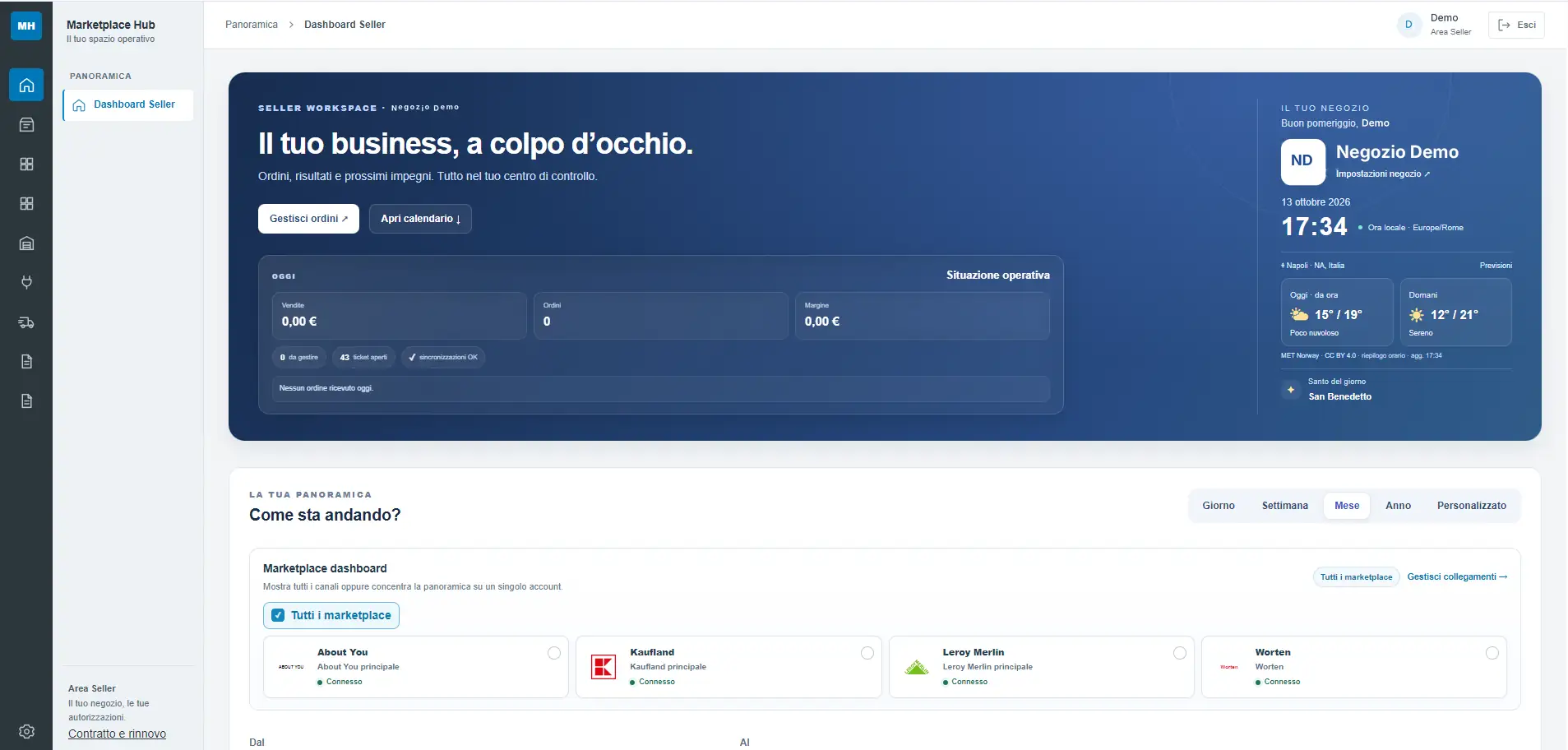
The interactive demo uses sample data: you can change values and follow the workflow without publishing products or creating real orders. The opening screenshot is authentic and anonymised; using your own accounts requires setting up the connections in the application.
Subscription, renewal and data
Expiry dates, service access and data recovery: review these terms before choosing your plan.
What happens if I do not pay for renewal?+
A 10-day grace period begins at the end of the approved contract period. During this time, you can still access the operational features available to your account, within the allowances and credits that remain valid. If renewal is not confirmed by the end of the grace period, access to operational areas is suspended. Expiry does not immediately delete your data.
How many days do I have to renew, and how are they counted?+
The grace period lasts 10 calendar days, including weekends and public holidays, from the day after the approved period ends. The end date is included in the service. Calculations use Europe/Rome: with an end date of 31 October, grace runs from 1 to 10 November inclusive and, without an approved renewal, suspension starts on 11 November at 00:00. Submit your request before expiry to allow time for it to be checked.
What can I still view after suspension?+
Account and contract information, renewal and dedicated functions for requesting data return or deletion remain accessible. Protected operational areas, including ordinary order and accounting exports, may be blocked. Data requests follow a separate process with authorisation checks: suspension does not require waiting until the retention period ends to submit one.
Are my data deleted as soon as my subscription expires?+
No. Expiry, operational suspension and deletion are separate events. For contracts adopting the retention policy, an ordinary period of six calendar months applies after suspension, subject to an early request or a specific documented exception. Earlier agreements keep their applicable terms until they adopt the new version. While your account remains accessible, it shows the accepted version, dates and actual data status. After account deactivation, the administration can provide the outcome or a receipt on request through the contractual contact channels, after verifying identity and authorisation.
How are the six months calculated, and which contracts do they apply to?+
The period is six calendar months, not 180 days, from suspension at 00:00 in Europe/Rome for contracts adopting the policy. The same day in the target month is used, or its last day if that day does not exist: suspension on 11 November means a deadline of 11 May at 00:00 and ordinary retention through 10 May. For a contract already suspended when the policy is accepted, the new period starts at the acceptance timestamp, without retroactive effect. Check the exact date and time in your account. Six months is a service rule, not a universal legal requirement.
How can I retrieve my data if I decide not to renew?+
Before expiry, use the available operational exports and check the files. Even after suspension, you can request data return through the dedicated account functions or contractual contact channels, specifying the data scope. Return takes place through the protected process after identity, permissions and recipient have been verified. Passwords, tokens, API keys, other credentials and other customers’ data are excluded. A copy request does not authorise deletion.
Send your request to the team and get a confirmation reference on the Contact and demo page.
Measuring the journey
We collect aggregate counts of visits and actions by language, path and screen size. We do not use analytics cookies or visitor identifiers. The counts represent interactions, not unique people. We respect the browser’s Do Not Track and Global Privacy Control signals.