









ACCOUNTING AND INVOICING
From order to invoice. Everything in order.
Orders arrive from your marketplaces. GestMark collects them, separates VAT by country and transfers the data to your connected accounting software. Supplier invoices have their place, too.
- Less data to copy
- Automatic VAT calculations

ENTER THE DATA ONCE
An order arrives. The invoice follows.
Products, amounts and customer details arrive through a direct API connection to the marketplace. You use the official order information without starting from a blank page.
- 01



GestMark collects the order
Find sales from connected channels such as Amazon, Kaufland and Worten, with products, amounts and customer details.
- 02



Choose your invoicing software
Choose from the invoicing tools listed in GestMark. Order details — customer, items, quantities, prices and VAT — are used according to the features of the active connection.
Explore all software - 03PDF
The invoice becomes a PDF
The accounting software generates the document. GestMark retrieves the PDF and keeps it linked to the original order.
- 04
The PDF goes back to the marketplace
GestMark attaches the PDF to the order on enabled channels such as Kaufland and Worten. The customer can find it in the marketplace dashboard.
The process follows the features of your connected accounting software and marketplace, including the checks and confirmations required for the document.
THE FINAL STEP IS YOURS
The electronic invoice is sent only when you decide.
Check the details, verify the amounts, then send the electronic invoice from your accounting software. GestMark does not submit invoices to Italy’s Exchange System (SdI).
PDF on the marketplace
The document available to the customer, linked to their order.
Electronic submission
The operator confirms it after the final check.
GERMANY, FRANCE, PORTUGAL…
Sell in more countries. Keep VAT clear.
A price has two parts: the sale value and VAT. GestMark separates them automatically using the order data and the tax rules configured for your business.
Keep each country clear
Organise sales by country and period, with the amount before tax and VAT shown separately.
The calculations are already done
Find the amounts you need for summaries and for your accountant’s work.
Rates, product types and tax treatment follow your account settings. The sales summary helps you prepare your tax obligations; paying taxes remains a separate task.
A SIMPLE EXAMPLE
How much VAT is in the price?
Choose a country and try changing the total.
Enter an amount from €0 to €1,000,000, with no more than two decimal places.
Illustrative example using standard rates: Germany 19%, France 20%, mainland Portugal 23%. Calculations for your orders follow the type of transaction and the configured tax treatment.
EMAIL, SUPPLIERS AND SELF-INVOICES
Your supplier’s invoice? It’s already in your inbox.
Connect Gmail, Outlook or an IMAP mailbox. GestMark looks for documents in authorised emails, retrieves attachments and collects them for accounting.
 Gmail
 OutlookIMAP
Fewer attachments to search for. More documents ready to check.
- 1
Connect your mailbox
Choose where to look, the period and the suppliers you need.
- 2
Collect the invoices
Find the PDFs you have received without downloading each attachment by hand.
- 3
Prepare the self-invoice
When required, prepare it in Fatture in Cloud using the supplier document’s data, then check it.
YOUR ACCOUNTING SOFTWARE
The software you use, in the same process.
Fatture in Cloud is one of the connections available in GestMark. The catalogue also includes other Italian and international software: choose the service and features that suit your account.
Software and services in the catalogue
Invoicing, documents and accounting for your business.
- Fatture in Cloud
- Aruba Fatturazione Elettronica
- Fattura24
 A-Cube
 Reviso
 Openapi
 Fattura Elettronica API
 Fattura per Tutti
 B2Brouter
- Sibill
International software
Tell us which software you use: we’ll help you work out the connection.
 Xero
 Pennylane
 Lexware Office
 Moloni
 Fakturownia
 Moneybird
Each connection has its own features. The document and PDF creation described here applies to Fatture in Cloud; for other services, the process depends on the connector and account.
INSIDE GESTMARK
Your accounting, up close.
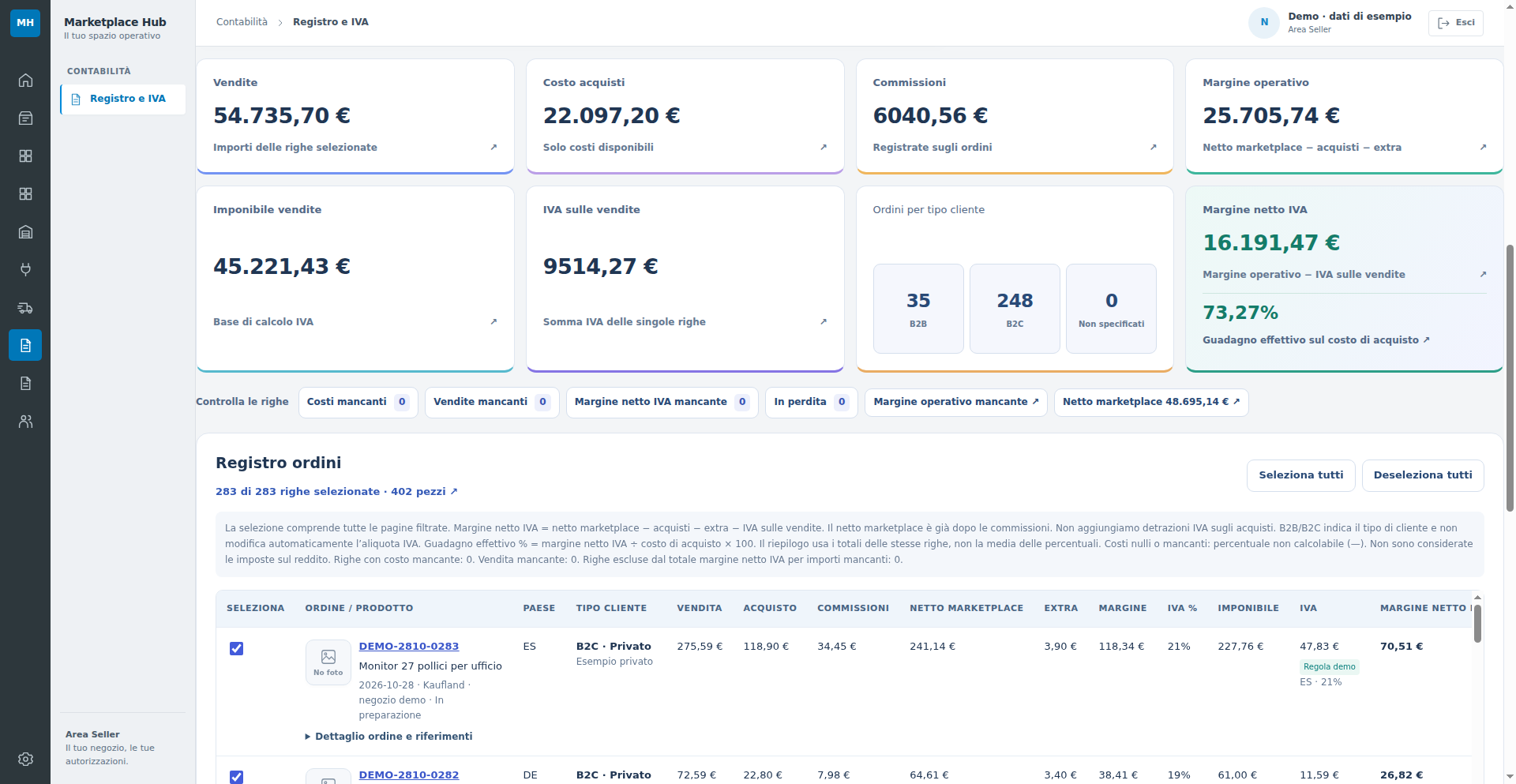
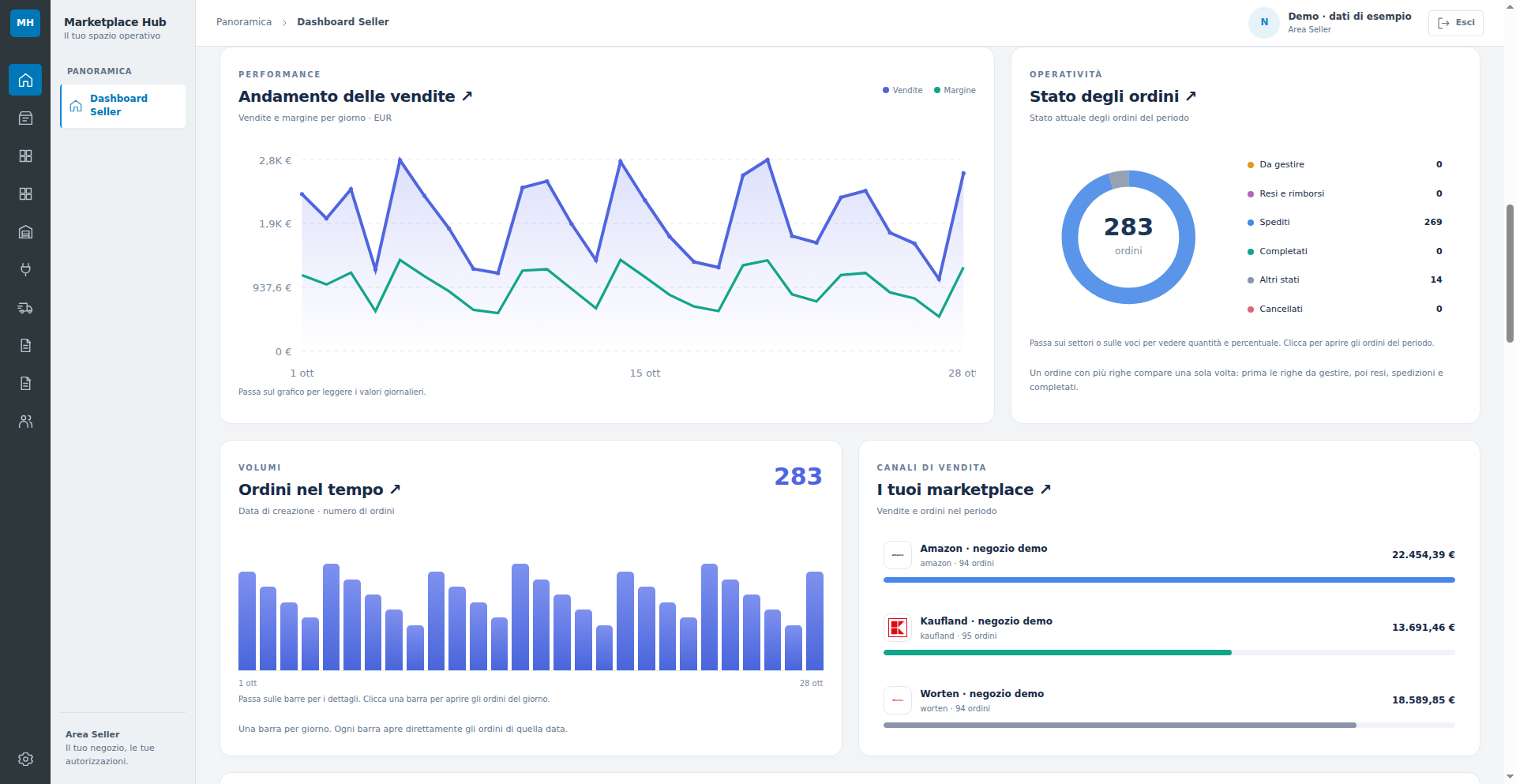
Sales, costs, margins and VAT by country in the Accounting section. Open the dashboard charts too, to follow sales and margin trends.
EVERYTHING CLEARER
Answers in simple words.
Do I need to copy order data again?
GestMark uses the data received from connected marketplaces. In the Fatture in Cloud process, this information fills in the document. You check the data and complete the required confirmations.
Does VAT change from one country to another?
GestMark uses the order’s tax data and the rules configured for your account. It separates the amount before tax from VAT and organises summaries by country and period. The settings take the product and applicable tax treatment into account.
Can I retrieve invoices from Gmail?
Yes. Connect your mailbox and authorise access. GestMark looks for supplier invoices and retrieves the attachments. You can use the collected documents to prepare the required self-invoices through the Fatture in Cloud connection.
Are the PDF and the electronic invoice sent in the same way?
They are two separate steps. The PDF is attached to the order on an enabled marketplace so the customer can find it. Electronic submission to SdI is carried out by the operator, from the accounting software and after checking the document.
Do all accounting programs and marketplaces offer the same features?
Features depend on the connection. The document process described here uses Fatture in Cloud and PDF uploads to Kaufland and Worten. Other programs in the catalogue offer different processes, to be defined according to your account.
Bring order to your accounting, too.
Let’s start with the marketplaces and accounting software you use. We’ll show you the process that suits your business.